Plan faster. Teach the way you want.
MentorDesk is a teacher assistant workspace that accelerates lesson planning, classroom activities, and assessments—without turning teaching into a template factory. It helps you move from idea to ready-to-teach plans quickly, while you stay in charge of what and how you teach.
Request a demo
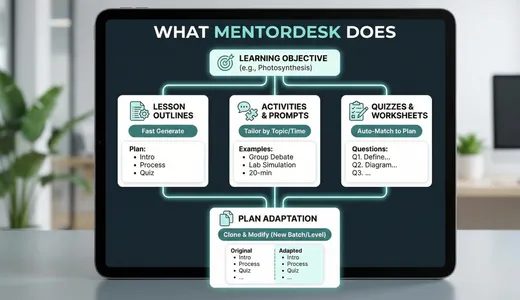
What MentorDesk does
MentorDesk gives teachers a single place to design lessons, activities, and assessments faster—always starting from the learning objective, not from a generic template.
- Turn learning objectives into draft lesson outlines in a few clicks.
- Generate activity ideas and discussion prompts aligned to the topic and duration.
- Create starter quizzes and worksheets that match the plan, not the other way around.
- Adapt existing plans for a new batch or level instead of rebuilding from scratch.
- Keep all pieces—plan, activities, assessments—linked to the same objective.
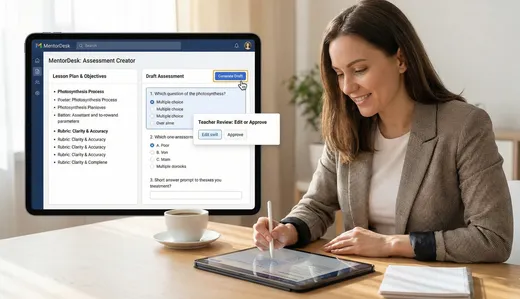
Assessments with teacher in control
MentorDesk speeds up assessment design while making sure it still reflects your expectations, standards, and rubrics.
- Generate draft questions from objectives or lesson content as a starting point.
- Organize quick checks, quizzes, and longer assessments around clearly defined criteria.
- Build and reuse rubrics so expectations stay consistent across sections and terms.
- Align assessments directly to the lesson plan segments they come from.
- Review and edit every question and rubric—nothing goes to students without your approval.

Assistant, not replacement
MentorDesk is designed so that teachers remain the decision‑makers. It suggests, drafts, and organizes—teachers review, adapt, and approve.
- You choose which suggestions to keep, change, or discard.
- No ‘auto publish’—everything is visible to you before it reaches learners.
- Designed to respect your subject expertise and teaching style.
- Supports your pedagogy instead of forcing a one‑size‑fits‑all structure.
- Helps new teachers get started and experienced teachers move faster.